

Erika @ MCM Mama Runs hosts Tuesdays on the Run with April @ Run the great wide somewhere and Patty @ My no-guilt life!
This week’s topic is: technology
That’s an easy one for me. I work in IT and I am quite a techie nerd.
I never run without my iPhone so I’ll talk about Running with Apps.
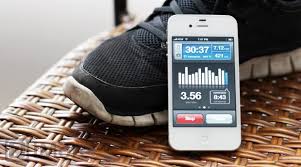
Here are the 10 iPhone apps recommended in Jessica Clark’s post. Please go to the post directly for more details on each app.
- Couch to 5K
- Fleetly
- RunKeeper
- Nike Training Club
- My Fitness Pal, Calorie Counter
- FitnessBuilder
- Boot Camp Challenge
- Kinetic GPS
- Fitocracy
- All-In YOGA
Here are a few more that I have heard of:
And some more that I have found:
- CruiseControl
- GhostRace
- iRace
- GetRunning
- RunCoach
- IntervalRun
- Fitnio
- Trailguru
- UltraTimer
- RunCalc
- Can Do 26.2
- Distance Meter Pro
- AerobicView
- Pedometer
- Run Chart
- TriCalc
- Endomondo (recommended by Natasha)
- RunGo
Since my original post on apps, I actually decided to try some of them myself. On these trials I was not using my Garmin because I didn’t care about pace and just want to get my miles in.
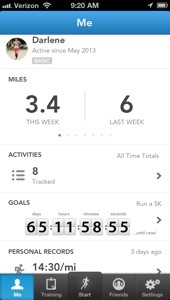
- Runkeeper – this one is free and I kinda like it. It is is easy to set up. It calls out your distance and pace. You can set goals and you can save a route.

- CruiseControl – this one costs $$ but not a lot. (I had a gift card or I wouldn’t have bought it.) This app pulls in all the music on your iphone according to cadence. You can set your targeted cadence and pace. It then adjusts the music as you run. Personally, this is a waste on me. I don’t choose my music according to cadence especially since I am in recovery mode. I choose music that I like. It has to have a catchy tune and a good beat to run with.
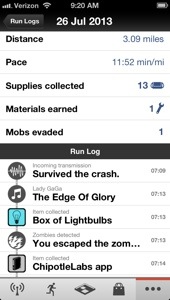
- Zombies, Run! – this one also costs $$ but not a lot. (I had a gift card or I won’t have bought it.) This one integrates missions with your music. It tracks your distance and pace. It is kinda cute. Although I was being chased by a zombie, when I was tired, it didn’t really motivate me to run faster. But that may be just me. If it were free, for a change of pace, I would use it.
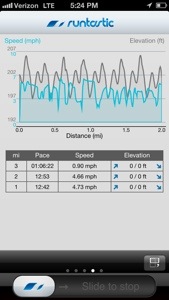
- Runtastic – there is a free version, I have Runtastic Pro that I got free. The Pro version offers voice feedback , auto pause and intervals. The free version has GPS tracking, measures time, distance and pace, shows a map of your run as well as charts for speed and elevation. I didn’t find it as intuitive as Runkeeper. (I had a hard time even fingering out how to end my workout and didn’t do it. OOPS.)
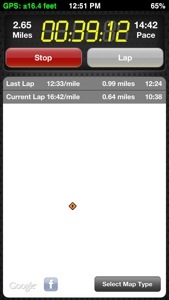
- WalkJogRun – this one cost $4.99. I have it. I am not sure if I bought it or got it for free. This app claims to be the most accurate regarding distance. it allows you to find nearby routes. It tracks your time, distance and pace per lap. It also offers FREE training plans for all distances and all levels. (The plans are worth the cost of the app.)

- NikePlus – this one is free. I started using this app since it required a shoe sensor insert and an ipod. The app has a lot more functionality. Right now, it is my favorite. It tracks your miles, shoes, shows your route. It is easy to add photos and post to FB, twitter & instagram.
All the apps above are easy to set up, link to your music and work with the GPS function on your iPhone. You also have the ability to share your runs on Facebook and Twitter, if you desire.
However, with all the iPhone apps, the GPS function is not as accurate as a Garmin GPS. So if you are serious about your pace and split times, you need to use a Garmin. Also using the GPS on the phone wears down the battery. I would be nervous using it on a long run. Plus, I rather have a charged phone if I am out running alone than a GPS.
So probably I’ll use the apps from time to time but when I race or train seriously, I’ll be back to my iphone for music, communication & photos and my Garmin for distance and pace.
 Happy Running! Do you use apps? If so, which one(s)?

 My First 5K and More...
I don’t use any apps just my good ol garmin! Also I have a blackberry so I probably wouldn’t be able to use those cool apps anyway!
LikeLike
I use the Runkeeper app occasionally. REALLY want a Garmin!
LikeLike
I used to use runkeeper before I got my Garmin and liked it a lot. I really need to explore some of those running apps to see what’s out there. Thanks for linking up with us!
LikeLike
I don’t use an app, i have a garmin forerunner 110 which is perfect for me in terms of my running. 🙂
LikeLike